
QuickStart
SleepTrack API
The SleepTrack API is a sleep analysis AI API that tracks sleep states by analyzing sound data collected from a smartphone in real time. It provides the SleepTrack SDK, which automatically manages the audio process and uploads data, enabling client apps to easily integrate sleep tracking functionality. Utilize this SDK to build a sample app that implements sleep tracking and basic sleep report features, allowing you to experience the SleepTrack API in the fastest way possible.
Quickstart with Sample App
Generate API Key
To build the sample app, you need to add the API Key to your environment variables. Sign in to the SleepTrack Dashboard to obtain your API Key. You can generate the API Key in the settings tab of your profile.
iOS Sample App
- Download the iOS sample app project from the GitHub repository to get started.
# iOS sample app
git clone https://github.com/asleep-ai/asleep-sdk-ios-sampleapp-public.git- If you are using Xcode’s Clone Git Repository feature,
https://github.com/asleep-ai/asleep-sdk-ios-sampleapp-public.git- Enter the issued API Key in the YOUR_API_KEY field of Debug.xcconfig and Release.xcconfig.
API_KEY=YOUR_API_KEY- To use webhooks, enter your URLs directly in place of the nil values in
baseUrl: nil, callbackUrl: nilat theinitAsleepConfig/ensureConfigcall sites in MainView.swift.
struct MainView: View {
    ...
    @AppStorage("sampleapp+apikey") private var apiKey = Bundle.main.object(forInfoDictionaryKey: "API_KEY") as? String ?? ""
@AppStorage("sampleapp+userid") private var userId = ""- Build and install the sample app on your iPhone.
- If a Signing error occurs, change the Bundle Identifier.
Android Sample App
- Download the Android sample app project from the GitHub repository to get started.
# Android sample app
git clone https://github.com/asleep-ai/asleep-sdk-android-sampleapp-public.git- If you are using Project from Version Control in Android Studio,
https://github.com/asleep-ai/asleep-sdk-android-sampleapp-public.git- Enter the API Key in local.properties.
asleep_api_key="YOUR_API_KEY"- If you want to receive sleep data via webhook, enter the callbackUrl information in Constants.kt.
object Constants {
    val BASE_URL: String? = null
    val CALLBACK_URL: String? = null
    const val ASLEEP_API_KEY = BuildConfig.ASLEEP_API_KEY
    const val SERVICE_NAME = "AsleepSampleApp"

    const val MIN_TRACKING_MINUTES = 5

    // intent extra names
    const val EXTRA_ASLEEP_USER_ID = "ASLEEP_USER_ID"
    const val EXTRA_SESSION_ID = "SESSION_ID"
    const val EXTRA_FROM_STATE = "FROM_STATE"

    enum class StateName {
        INIT, TRACKING
    }
}- Build the sample app and install it on an Android smartphone.
Sample App Branches
Android — asleep-sdk-android-sampleapp-public
| Branch | Description |
|---|---|
| main | Basic — API Key + beginSleepTracking() + report polling |
| sample/init-startstop-polling | Direct control with SleepTrackingManager.startSleepTracking()/stopSleepTracking() (the app implements its own Foreground Service) |
| sample/init-beginend-complete-recording | CompletableAsleepTrackingListener + keeping the recording file (recordingPath/RecordingType) |
| sample/setup-product-beginend-polling | Device (Product) registration with Asleep.setup() + ProductInfo before initialization |
| sample/init-appid-beginend-polling | appId/appSecret token authentication instead of API Key (local.properties keys: asleep.appId / asleep.appSecret) |
| Branch | Description |
|---|---|
| main | Basic — API Key + SleepTrackingManager + report polling |
| sample/init-complete-recording | Analysis completion callback + keeping the recording file (RecordingType) |
| sample/setup-product-polling | Device registration with Asleep.setup() + ProductInfo |
| sample/init-appid-polling | appId/appSecret token authentication |
※ If you want to switch from API Key to appId/appSecret authentication, please contact [email protected].
Sleep Tracking and Sleep Report
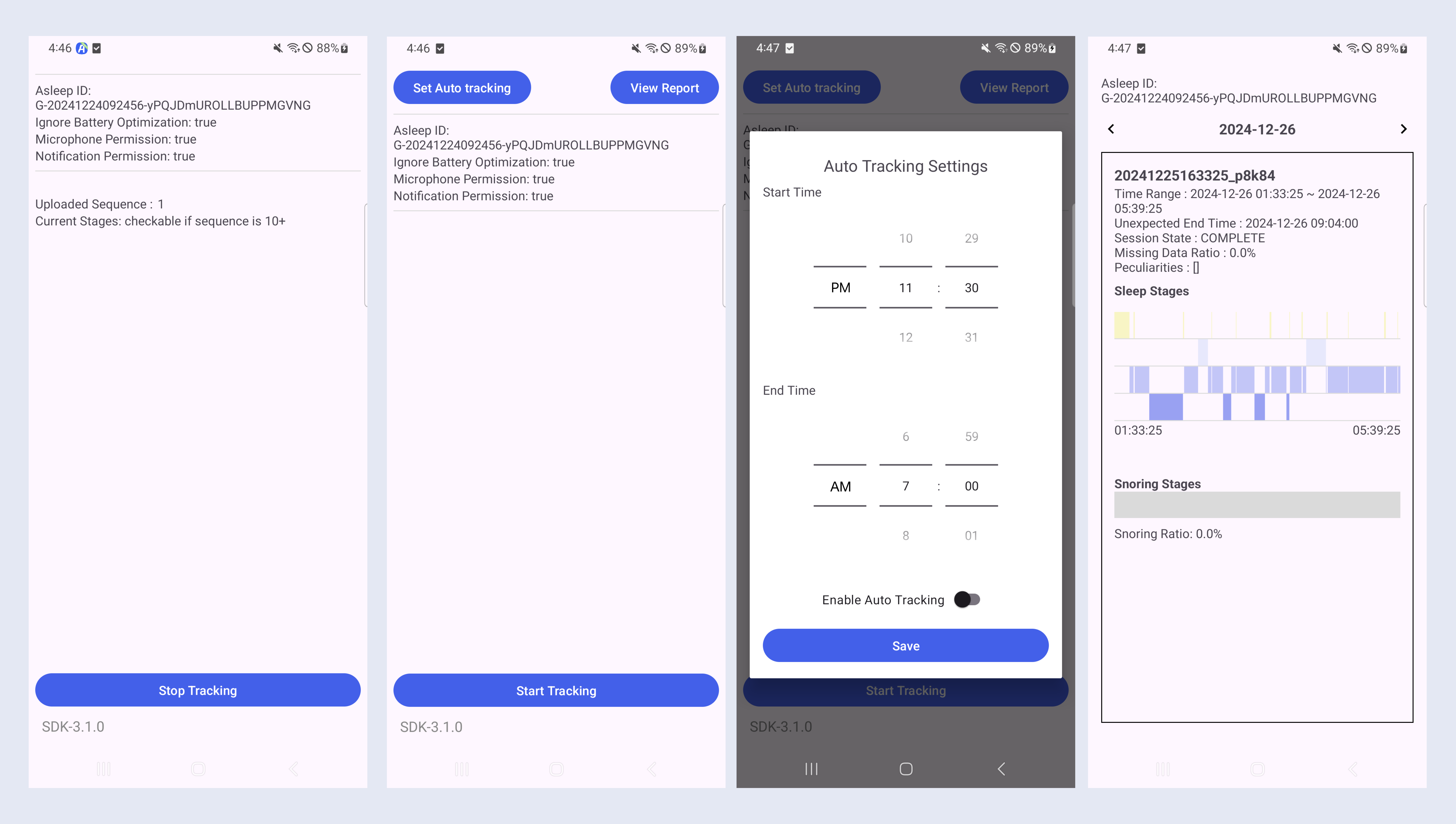
Sleep tracking requires the microphone permission. On Android, granting the notification permission and setting a battery optimization exemption are also recommended (for stable background tracking).
You must track for at least 5 minutes to receive sleep analysis results.
Retrieving Sleep Data
Retrieving Sleep Data Using API / SDK
Sleep data tracked through the SDK can be retrieved by calling the Reports or Data API of the SDK. Since the uploaded sound data is processed asynchronously on the AI server, you need to use a polling approach to check sleep data in real time via the SDK Reports or Data API.
iOS SDK
var config: Asleep.Config?
var reports: Asleep.Reports?

if let config {
    reports = Asleep.createReports(config: config)
}
Android SDK
val reports = Asleep.createReports(asleepConfig)

reports?.getReport(sessionId, object : Reports.ReportListener {
    override fun onSuccess(report: Report?) {
    }

    override fun onFail(errorCode: Int, detail: String) {
    }
})
Data API
curl "https://api.asleep.ai/data/v3/sessions/{session_id}" -XGET \
  -H "x-api-key: <YOUR_API_KEY>" \
  -H "x-user-id: <USER_ID>"
Receiving Realtime Sleep Data via Webhook
You can receive a webhook when the AI server completes the analysis by registering a callback URL. To do this, you must register the callback URL during the SDK initialization phase. An example of the data sent via webhook is shown below.
Realtime Sleep Data
{
    "event": "INFERENCE_COMPLETE",
    "version": "V3",
    "data": {
        "user_id": "G-20250115025029-vLErWBfQNtnfvgDccFOQ",
        "session_id": "20250115025029_fvivn",
        "seq_num": 39,
        "inference_seq_num": 3,
        "sleep_stages": [0], // omitted
        "breath_stages": null,
        "snoring_stages": [0] // omitted
    }
}
Complete Sleep Data upon Session Termination
{
    "event": "SESSION_COMPLETE",
    "version": "V3",
    "data": {
        "timezone": "UTC",
        "peculiarities": ["NO_BREATHING_STABILITY"],
        "missing_data_ratio": 0.0,
        "user_id": "G-20250115025029-vLErWBfQNtnfvgDccFOQ",
        "session": {
            "id": "20250115025029_fvivn",
            "state": "COMPLETE",
            "start_time": "2025-01-15T02:50:29+00:00",
            "end_time": "2025-01-15T03:50:29+00:00",
            "unexpected_end_time": null,
            "created_timezone": "UTC",
            "sleep_stages": [0], // omitted
            "breath_stages": null,
            "snoring_stages": [0] // omitted
        },
        "stat": {
            "sleep_time": "2025-01-15T03:05:29+00:00",
            "wake_time": "2025-01-15T03:26:29+00:00",
            "sleep_index": 50,
            "sleep_latency": 900,
            "wakeup_latency": 1440,
            "light_latency": 0,
            "deep_latency": null,
            "rem_latency": null,
            "time_in_bed": 3600,
            "time_in_sleep_period": 1260,
            "time_in_sleep": 1080,
            "time_in_wake": 180,
            "time_in_light": 1080,
            "time_in_deep": 0,
            "time_in_rem": 0,
            "time_in_stable_breath": null,
            "time_in_unstable_breath": null,
            "time_in_snoring": 0,
            "time_in_no_snoring": 1260,
            "sleep_efficiency": 0.3,
            "sleep_ratio": 0.86,
            "wake_ratio": 0.14,
            "light_ratio": 0.86,
            "deep_ratio": 0.0,
            "rem_ratio": 0.0,
            "stable_breath_ratio": null,
            "unstable_breath_ratio": null,
            "snoring_ratio": 0.0,
            "no_snoring_ratio": 1.0,
            "breathing_index": null,
            "breathing_pattern": null,
            "waso_count": 1,
            "longest_waso": 180,
            "sleep_cycle_count": 0,
            "sleep_cycle": null,
            "sleep_cycle_time": [],
            "unstable_breath_count": null,
            "snoring_count": 0
        }
    }
}
Retrieving Sleep Data from the Dashboard
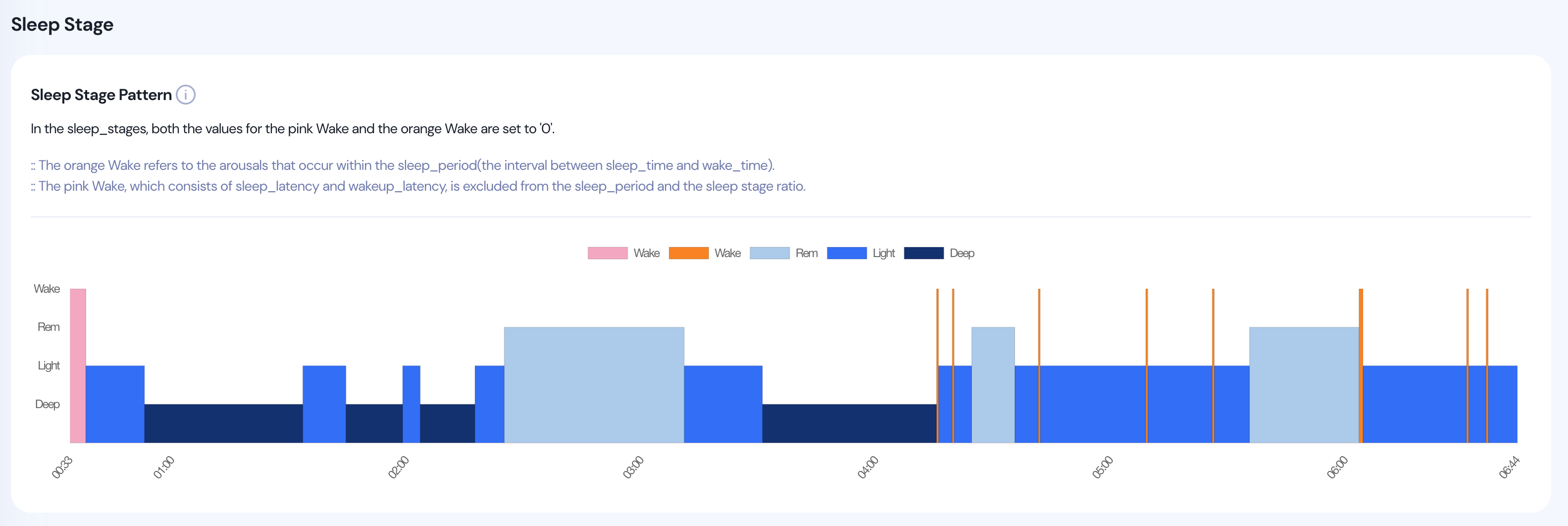
On the dashboard, you can visually check the sleep data tracked using the API Key of your logged-in account. Before implementing the report UI in the client app, you can easily verify whether the sleep tracking in the test environment was successful through the dashboard.
Updated about 2 months ago